Offshore 1
$3.09/ month
3 mo $8.346 mo $14.8312 mo $25.95
- 1 vCPU
- 1 GB RAM
- 20 GB NVMe
- 2 TB traffic
Guide · Send-only SMTP
Your application, your WordPress site and your server's alerts need to send mail from a VPS you pay for in USDT or another coin, since crypto is the only way to pay, and nothing on that VPS needs to receive mail. Here are the three routes, a Postfix that never listens on the internet, msmtp for scripts, the DNS records, and what the logs say when a message does not arrive.
Sending from a VPS, in short
To send email from a VPS without running a full mail server, pick one of three routes. Direct delivery: a send-only Postfix that listens on 127.0.0.1 only and delivers on port 25, which is open on every Nymhost VPS. A relay (smarthost): Postfix or msmtp logs in to a mail service on port 587 or 465, and that service delivers. An HTTP API: your application posts each message to a provider over HTTPS. Whatever the route, publish SPF, sign with DKIM and ask support about reverse DNS. Mail your application sends one message at a time is fine; bulk email is forbidden.
A VPS sends email in one of three ways. They differ in who hands the message to the recipient's server, whose IP address receivers judge, and what happens when delivery fails. On many clouds only the last two work because outbound port 25 is blocked (the 12-host comparison on the port 25 page shows where). On a Nymhost VPS, outbound port 25 is open in all 9 cities, so direct delivery is on the table too.
| Route | Leaves the VPS on | Who delivers to the recipient | Whose IP reputation counts | If delivery fails | Software on the VPS |
|---|---|---|---|---|---|
| Direct delivery | Port 25, to each recipient's MX host | Your Postfix | Your VPS IPv4 address | After a temporary error, Postfix keeps the message and retries, for up to 5 days by default (maximal_queue_lifetime) | Postfix, send-only |
| Relay (smarthost) | Port 587 (STARTTLS) or 465 (TLS from the first byte), with a login | The relay service | The relay's | Through Postfix: queued and retried. Through msmtp: the command fails with an error code and the caller must retry | Postfix or msmtp |
| HTTP API | Port 443 (HTTPS), with an API key | The provider | The provider's | The API answers with an error; your code must retry | None: a library in your application |
With a relay or an API, a third party handles every message you send, under its own rules and rate limits.
You can also mix the first two: deliver directly and relay only the domains that are hard to reach, as in the hybrid setup below.
Postfix's documentation calls the closest setup a null client: a machine that can only send mail, receives none from the network and delivers nothing locally. Its example hands everything to a central mail hub; the version here delivers directly instead. Four settings:
inet_interfaces = loopback-only: Postfix accepts mail from the VPS itself only. Nothing listens on your public address, so there is no firewall port to open and nothing for strangers to relay through. The manual says to stop and start Postfix after this change; a reload is not enough.mydestination =, empty: no local delivery, so every message leaves the server.myorigin = $mydomain: mail goes out as [email protected], not [email protected].relayhost =, empty: direct delivery. Postfix looks up each recipient's MX record and connects on port 25.Set myhostname to a name that resolves to your VPS, such as vps.example.com: Postfix sends it in its HELO greeting, and it is the name to ask for in reverse DNS. inet_protocols = ipv4 keeps delivery on the address your SPF record and PTR cover; the IPv6 note on the port 25 page explains why. smtp_tls_security_level = may encrypts whenever the receiving server offers STARTTLS; Postfix's TLS guide advises against mandatory TLS for delivery to the internet.
When the Debian or Ubuntu installer asks for the type of mail configuration, pick Internet Site, then run the commands below. Programs on the VPS can then call sendmail or connect to 127.0.0.1 port 25 without a password, because Postfix trusts only the local machine by default (mynetworks_style = host since Postfix 3.0).
apt install -y postfix
postconf -e "myhostname = vps.example.com"
postconf -e 'myorigin = $mydomain'
postconf -e "mydestination ="
postconf -e "relayhost ="
postconf -e "inet_interfaces = loopback-only"
postconf -e "inet_protocols = ipv4"
postconf -e "smtp_tls_security_level = may"
# inet_interfaces and inet_protocols need a full stop and start
systemctl stop postfix
systemctl start postfix
postconf -n
ss -ltnp | grep ':25 'A relay, or smarthost, accepts your messages after a login and delivers them for you. Postfix logs in through the Cyrus SASL library, and Debian 13's Postfix package only suggests libsasl2-modules, which provides the PLAIN and LOGIN mechanisms: install it. From Postfix's SASL and TLS guides:
relayhost = [smtp.relay.example]:587 sends all mail to the relay; the brackets stop MX lookups for that name.smtp_sasl_password_maps names a file with one username:password per relay, keyed exactly as relayhost is written, brackets and port included.smtp_sasl_tls_security_options = noanonymous allows a plaintext login once the session is encrypted. Without it Postfix refuses plaintext mechanisms, and if the relay offers nothing else it logs No worthy mechs found.smtp_tls_security_level = secure requires TLS and checks the relay's certificate. The TLS guide says this level suits a client that sends all its mail to one mail hub; encrypt encrypts without checking.postmap copies the password file's group and other permissions to the table it builds, so make the file readable by root only first. $default_database_type, written the way Postfix's manual writes it, picks hash or lmdb for your build.
For port 465, use relayhost = [smtp.relay.example]:465 with smtp_tls_wrappermode = yes, and :465 in sasl_passwd; the manual says wrapper mode needs the encrypt level or stronger.
apt install -y libsasl2-modules
postconf -e "relayhost = [smtp.relay.example]:587"
postconf -e "smtp_sasl_auth_enable = yes"
postconf -e 'smtp_sasl_password_maps = $default_database_type:/etc/postfix/sasl_passwd'
postconf -e "smtp_sasl_tls_security_options = noanonymous"
postconf -e "smtp_tls_security_level = secure"
postconf -e "smtp_tls_CAfile = /etc/ssl/certs/ca-certificates.crt"[smtp.relay.example]:587 USERNAME:PASSWORD
# then, as root:
chmod 600 /etc/postfix/sasl_passwd
postmap /etc/postfix/sasl_passwd
postfix reloadWith outbound port 25 open, you can relay only the domains that need it. Keep the send-only setup (relayhost empty, smtp_tls_security_level = may) and add three tables. Postfix logs in only where sasl_passwd has an entry for the next hop, so direct deliveries never send the password. Write that next hop the same way in every table, as the TLS guide asks.
postconf -e 'transport_maps = $default_database_type:/etc/postfix/transport'
postconf -e 'smtp_tls_policy_maps = $default_database_type:/etc/postfix/tls_policy'
postconf -e "smtp_tls_CAfile = /etc/ssl/certs/ca-certificates.crt"
postconf -e "smtp_sasl_auth_enable = yes"
postconf -e 'smtp_sasl_password_maps = $default_database_type:/etc/postfix/sasl_passwd'
postconf -e "smtp_sasl_tls_security_options = noanonymous"

# /etc/postfix/transport
gmail.com                   smtp:[smtp.relay.example]:587

# /etc/postfix/tls_policy
[smtp.relay.example]:587    secure

# /etc/postfix/sasl_passwd (chmod 600 before postmap)
[smtp.relay.example]:587    USERNAME:PASSWORD

postmap /etc/postfix/transport
postmap /etc/postfix/tls_policy
postmap /etc/postfix/sasl_passwd
postfix reloadmsmtp is an SMTP client, not a mail server: it reads one message, hands it to the server named in its configuration and exits, with no daemon and no listening port. Debian's msmtp-mta package adds /usr/sbin/sendmail, so cron and PHP use msmtp unchanged. Install msmtp-mta or Postfix, not both: each provides that command.
The trade-off is the queue. If the relay cannot be reached, msmtp exits with an error code and the message is lost unless the caller retries; Postfix would keep it. For alerts that is often acceptable, and Debian's msmtp package includes optional queue scripts (msmtpq).
Two Debian details. /etc/msmtprc holds the password, so Debian's README for msmtp suggests mode 0640 and group msmtp: the setgid msmtp binary can read it, other users cannot. And msmtp's AppArmor profile limits passwordeval to helpers such as gpg, secret-tool and pass. For a relay on port 465, set port 465 and tls_starttls off.
defaults
auth on
tls on
syslog LOG_MAIL

account relay
host smtp.relay.example
port 587
from [email protected]
user USERNAME
password PASSWORD

account default : relayapt install -y msmtp msmtp-mta
# write /etc/msmtprc as above, then:
chmod 0640 /etc/msmtprc
chgrp msmtp /etc/msmtprc
msmtp --pretend
msmtp --serverinfo
printf 'From: [email protected]\nSubject: msmtp test\n\nSent from my VPS.\n' | msmtp [email protected]Most software on a Linux server sends mail by calling /usr/sbin/sendmail, which Postfix and msmtp-mta both provide. Once one of them works:
mail() runs the program in sendmail_path, by default /usr/sbin/sendmail -t -i. Nothing to change in php.ini.wp_mail() builds the message with PHPMailer and hands it to PHP's mail(). Without a From header it uses wordpress@ plus your site's domain (minus any www), so that domain needs the SPF and DKIM records below; the wp_mail_from filter or an SMTP plugin changes it. WordPress's reference warns that a true return value does not mean the message arrived: read the mail log.127.0.0.1, port 25, no login, to use the local Postfix, or straight at the relay on port 587 with its credentials.MAILTO; MAILTO="" turns it off.unattended-upgrades mails its report to the address in Unattended-Upgrade::Mail. The Debian wiki notes that this may need a local mail transport, which you now have.# crontab -e
[email protected]
0 4 * * * /usr/local/bin/backup.sh
# /etc/apt/apt.conf.d/52unattended-upgrades-local
Unattended-Upgrade::Mail "[email protected]";Receivers check that the domain in your From address allows the server that sent the message. Google asks every sender to Gmail for SPF or DKIM, valid forward and reverse DNS and TLS, and adds DMARC above 5,000 messages a day. Set up all three anyway.
include: and a each cost a DNS lookup, with a limit of 10.sendmail callers reaches Postfix outside SMTP, and Postfix's Milter guide filters it through non_smtpd_milters only: set it as well as smtpd_milters, or that mail leaves unsigned.p=none (no preference, in the words of RFC 9989) and an rua address you read.Google also asks for one From address per category of message; a subdomain such as alerts.example.com keeps server mail apart from personal mail.
| How the domain sends | SPF record (one TXT record on example.com) | Notes |
|---|---|---|
| Direct from the VPS | v=spf1 ip4:203.0.113.10 -all | Add ip6: only if you deliver over IPv6 with its own PTR |
| Through a relay or an API | v=spf1 include:spf.relay.example -all | The provider's documentation gives the exact include: |
| A hosted mailbox and the VPS | v=spf1 include:spf.mailhost.example ip4:203.0.113.10 -all | One record that lists both senders |
-all makes every other sender a fail. Check the result in the Authentication-Results header of a test message, as the next section shows.
Send one message to an address you control at a large mailbox provider, then follow it in the log. Postfix writes one line per delivery attempt, with the recipient, the server it connected to (relay=), a status code (dsn=) and a status such as sent. The text in brackets is the receiving server's own answer, the fastest clue when something goes wrong. After a temporary error the message waits in the deferred queue and Postfix tries again later: postqueue -p lists what is waiting, postqueue -f retries now.
When the message arrives, open its full headers and find Authentication-Results, the header defined in RFC 8601. You want spf=pass and dkim=pass, plus dmarc=pass once DMARC is published. msmtp also logs one line per attempt: smtpstatus= and smtpmsg= carry the server's answer on failure, and exitcode=EX_OK means success.
printf 'From: [email protected]\nSubject: Test from my VPS\n\nIf you read this, sending works.\n' | sendmail -f [email protected] [email protected]
journalctl -u 'postfix*' --since '10 minutes ago'
postqueue -p
postqueue -f

# with msmtp and syslog LOG_MAIL instead:
journalctl --since '10 minutes ago' | grep msmtppostfix/smtp[30840]: 19B6B2900FE: to=<[email protected]>, relay=mail.example.com[1.2.3.4], delay=0.22, delays=0.04/0.01/0.05/0.1, dsn=2.0.0, status=sent (250 2.0.0 Ok)Start from what the log or the bounce says, fix one thing, and send another test.
| Symptom | Likely cause | Fix |
|---|---|---|
| Messages stay deferred and the reason says the connection timed out | Port 25 filtered by an output rule in your own firewall, or by a provider that blocks it | Run the port 25 test; check nft list ruleset or ufw status verbose |
| Mail to your own domain never reaches your mailbox | The domain is in mydestination, so Postfix delivers it locally | postconf -e "mydestination =", then postfix reload |
Gmail answers 550 5.7.25 | The sending IP has no PTR record, or its forward DNS does not match | Ask support about reverse DNS, or relay mail for that domain |
Gmail answers 550 5.7.26 or 550 5.7.27 | The message is unauthenticated, or SPF failed | One SPF record that lists the real sender; add DKIM |
Gmail answers 550 5.7.1 about IPv6 sending guidelines | Postfix delivered over IPv6 from an address without a PTR | inet_protocols = ipv4, then stop and start Postfix |
SASL authentication failure: No worthy mechs found | Plaintext login refused by the default policy, or the SASL modules are missing | smtp_sasl_tls_security_options = noanonymous; install libsasl2-modules |
| The relay refuses with a 5xx answer naming the sender | That From address is not allowed on your relay account | Send from an address your relay account accepts; in msmtp, set from |
| PHP or cron mail leaves without a DKIM signature | The DKIM milter is in smtpd_milters only | postconf -e 'non_smtpd_milters = $smtpd_milters', then postfix reload |
Gmail answers 421 4.7.28, or rate-limits you with 421 4.7.0 | An unusual rate of mail from your IP, or a low reputation | Find what is sending (postqueue -p, the log); an abused form or plugin is a common source |
Outbound port 25 is open on every plan for your own mail. The rule is about what you send.
Spam and bulk email are forbidden from any server or address, as the usage rules say. A form or plugin abused to send spam still makes your VPS the sender: keep it updated.
A server that sends your application's mail is a running cost like any other, and crypto is the only way to pay for it. USDT suits that cost because it tracks the dollar, the currency of every price and of the $25 minimum top-up: send it on Tron (TRC-20), credited after 20 confirmations, about 2 minutes on the checkout, or on Ethereum (ERC-20), after 12, and send exactly the amount the checkout shows on the network you picked. $25 covers Offshore 1, enough for alerts and a small site, for 6 months ($14.83), and the $10.17 left stays on a balance that never expires; paying for a VPS with USDT on Tron or Ethereum goes through both networks.
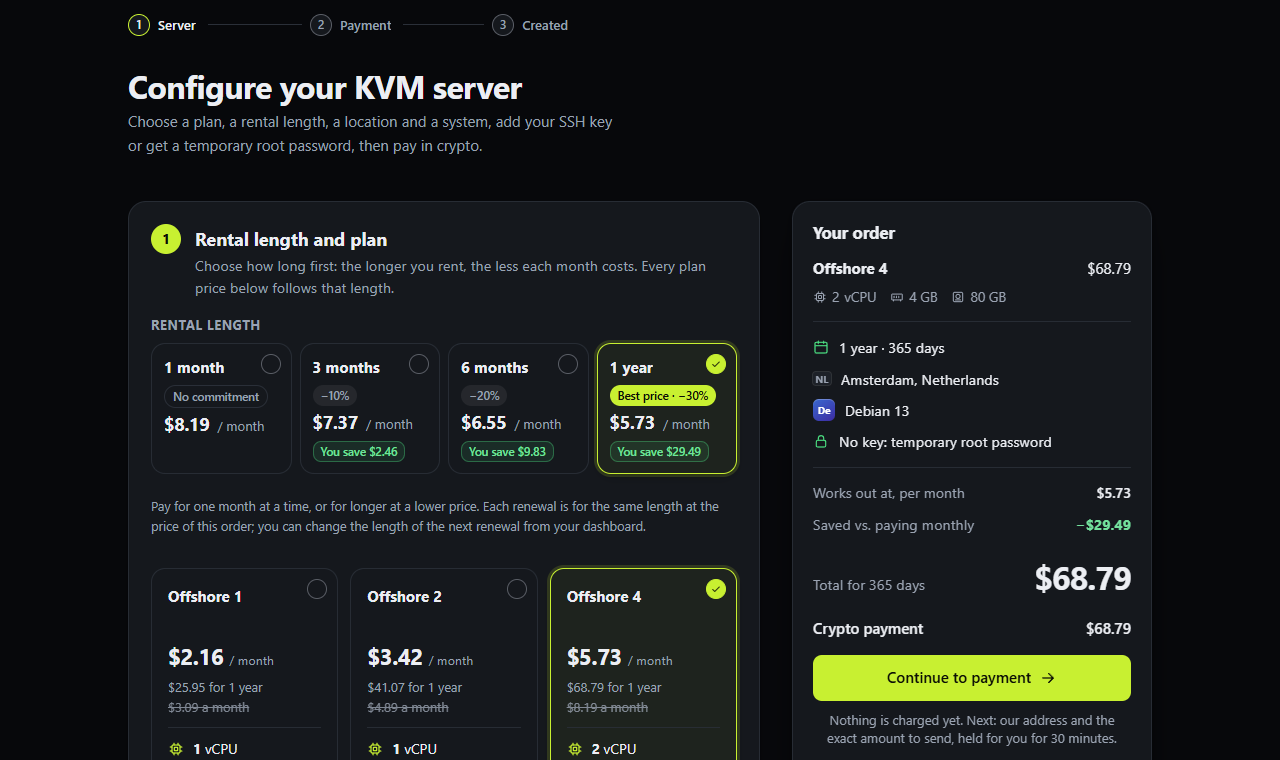
A send-only Postfix or msmtp is a small program next to your application, so choose the plan for the application. Offshore 1 ($3.09 a month, 1 GB of RAM) fits alerts and a small site; Global 2 ($3.19, 2 GB) or Offshore 2 ($4.89, 2 GB) leave room for WordPress. Outbound port 25 is open on all of them. To receive mail as well, see which VPS for a full mail server. Every plan and city is on the pricing page, and the anonymous VPS overview lists what Nymhost keeps about you.
Amsterdam · Reykjavik · Zurich · Bucharest
$3.09/ month
3 mo $8.346 mo $14.8312 mo $25.95
$4.89/ month
3 mo $13.206 mo $23.4712 mo $41.07
$8.19/ month
3 mo $22.116 mo $39.3112 mo $68.79
$13.49/ month
3 mo $36.426 mo $64.7512 mo $113.31
$20.49/ month
3 mo $55.326 mo $98.3512 mo $172.11
New York · Dallas · Los Angeles · London · Amsterdam · Frankfurt
$3.19/ month
3 mo $8.616 mo $15.3112 mo $26.79
$6.39/ month
3 mo $17.256 mo $30.6712 mo $53.67
$9.59/ month
3 mo $25.896 mo $46.0312 mo $80.55
$19.19/ month
3 mo $51.816 mo $92.1112 mo $161.19
$29.39/ month
3 mo $79.356 mo $141.0712 mo $246.87
Prices in US dollars, checked on 18 November 2026. Paid from a crypto balance (minimum top-up $25); 3, 6 and 12 months save 10, 20 and 30%. Every plan: KVM, root over SSH, 1 dedicated IPv4 + /64 IPv6, shared 1 Gbit/s port.
Yes. A send-only Postfix accepts mail from programs on the VPS only and delivers it: no mailboxes, no IMAP, no open port. msmtp is lighter still; it hands each message to a relay and exits. Or call a provider's HTTP API from your application. Receiving mail is a separate job, covered in the full mail server tutorial.
No. Outbound port 25 is open on every Nymhost VPS, in all 9 cities, from the moment it is built, with no ticket and no review. Postfix can deliver straight to other mail servers. The one condition is the rule on content: spam and bulk email are forbidden, and a VPS used for either is suspended.
Send directly when the mail goes to you or to people who expect it, at low volume, and your IP has reverse DNS. Use a relay when messages must reach large mailbox providers from an address with no sending history, accepting that the relay handles every message. With port 25 open you can mix both: direct by default, relay for one domain.
Usually one of four things: no reverse DNS on the IP, SPF or DKIM failing for the From domain, an address with no history or a blocklist entry, or Postfix delivering over IPv6 without a PTR. The receiving server's answer in your mail log and the Authentication-Results header of a delivered message tell you which.
Install a send-only Postfix or msmtp-mta. WordPress sends through PHP's mail(), which calls /usr/sbin/sendmail, so no plugin is required. Use a From address on your own domain (the default is wordpress@ plus the site's domain) and publish SPF and DKIM for that domain. An SMTP plugin pointed at a relay is the alternative.
Both carry submission with a login. Port 587 starts in plain text and switches to TLS with STARTTLS; port 465 uses TLS from the first byte. Postfix needs smtp_tls_wrappermode = yes for 465, and msmtp needs tls_starttls off. Use the port your relay documents; the port comparison gives the RFC background.
The rule is about what you send, not a number. Messages your application or server sends to people who expect them are fine; newsletters, marketing lists and cold outreach are bulk email and are forbidden. Receivers set their own limits: Google asks senders to keep their spam rate below 0.3% and rate-limits unusual volumes from one IP.