Offshore 1
$3.09/ month
3 mo $8.346 mo $14.8312 mo $25.95
- 1 vCPU
- 1 GB RAM
- 20 GB NVMe
- 2 TB traffic
Guide · Updated 18 November 2026
Crypto is the only way to pay for a Nymhost VPS. Here are the seven coins, their networks, confirmation counts and typical times, the prepaid balance with its $25 minimum, and the path from the plan list to your first SSH login.
The short version
To buy a VPS with crypto at Nymhost, you create an account (a 16-digit number, no email needed), top up a prepaid balance of at least $25 in Bitcoin, USDT, USDC, Ethereum, Solana, Litecoin or Monero, then order a plan from that balance. Send the exact amount the checkout shows, on the network you chose. Once the payment is confirmed, a person builds the server, usually within minutes and never more than 1 hour later, and you log in as root over SSH. Plans start at $3.09 a month.
A crypto payment to a host is a transfer to an address, credited once the network confirms it. Nymhost adds one layer: you pay into a prepaid balance, not one invoice per server, and the VPS you order is charged from it for 1, 3, 6 or 12 months.
The minimum top-up is $25, though the smallest plan costs $3.09 a month; the balance never expires, so the rest pays later renewals. The checkout shows the exact amount in your coin, so you never convert dollars yourself.
Nymhost is a cryptocurrency VPS host in the strict sense: no card, no PayPal, no bank transfer. Some large hosts take no crypto at all: see what that means if you wanted to buy a Hetzner VPS with crypto. The pricing page shows every plan, and the no-KYC VPS page lists what Nymhost does and does not ask you for.
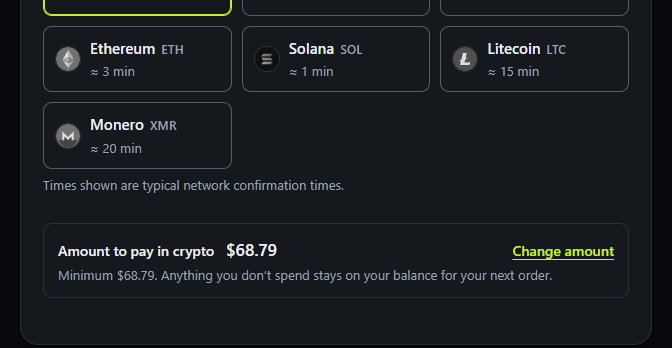
The seven coins accepted today. A confirmation is a block added after the one holding your payment; your balance is credited once the count in the third column is reached. A higher count does not mean a longer wait: on the checkout's figures, 20 confirmations of USDT on Tron take about 2 minutes, 2 confirmations of Bitcoin about 20.
| Coin | Network | Confirmations | Typical network time |
|---|---|---|---|
| Bitcoin BTC | Bitcoin | 2 | ≈ 20 min |
| Tether USDT | Tron (TRC-20), Ethereum (ERC-20) | 20 / 12 | ≈ 2 min / ≈ 3 min |
| USD Coin USDC | Ethereum (ERC-20) | 12 | ≈ 3 min |
| Ethereum ETH | Ethereum | 12 | ≈ 3 min |
| Solana SOL | Solana | 1 | ≈ 1 min |
| Litecoin LTC | Litecoin | 6 | ≈ 15 min |
| Monero XMR | Monero | 10 | ≈ 20 min |
Typical times are the checkout's figures for each network, not a promise; the top-up is credited after its confirmations. USDT is accepted on two networks: pick the network your wallet or exchange withdraws on, and send on that network only.
The whole path, in the order you will see it.
Choose a range, a plan, one of the 9 cities and a Linux system: Debian 13 or 12, Ubuntu 24.04 or 22.04 LTS, AlmaLinux 10 or Rocky Linux 10. Windows is not offered. Pick 1, 3, 6 or 12 months: longer rentals take 10%, 20% or 30% off.
If you paste a public key at checkout, password login stays off. If you skip it, the team sets a temporary root password that appears in your dashboard, and you change it at your first login.
The checkout gives you a 16-digit account number. It is your only login. With an optional email on file you can recover it; without one, a lost number is gone for good.
Select the coin you hold and its network. The page then shows an address and an exact amount for a top-up of at least $25. A payment always funds the balance, and the balance pays the VPS.
In your wallet, paste the address and the amount, and check the network before you confirm. If you withdraw from an exchange, remember its withdrawal fee comes out of what you send or what arrives, depending on the exchange: make sure the full amount reaches the address.
Your dashboard credits the balance once the confirmation count for your coin is reached: 1 block for Solana, 2 for Bitcoin, 6 for Litecoin, 10 for Monero, 12 for Ethereum, USDC and USDT on Ethereum, and 20 for USDT on Tron. The checkout shows about 1 minute for Solana, 2 for USDT on Tron, 3 on Ethereum, 15 for Litecoin and 20 for Bitcoin or Monero.
After the payment confirms, a person builds your VPS: usually within minutes, never more than 1 hour later. The dashboard follows the build, then shows the IP address.
Connect with ssh root@your-ip-address. Reboot, reinstall and delete are requests you send from the dashboard, and a person carries them out. No plan includes backups, so keep your own copy of what matters.
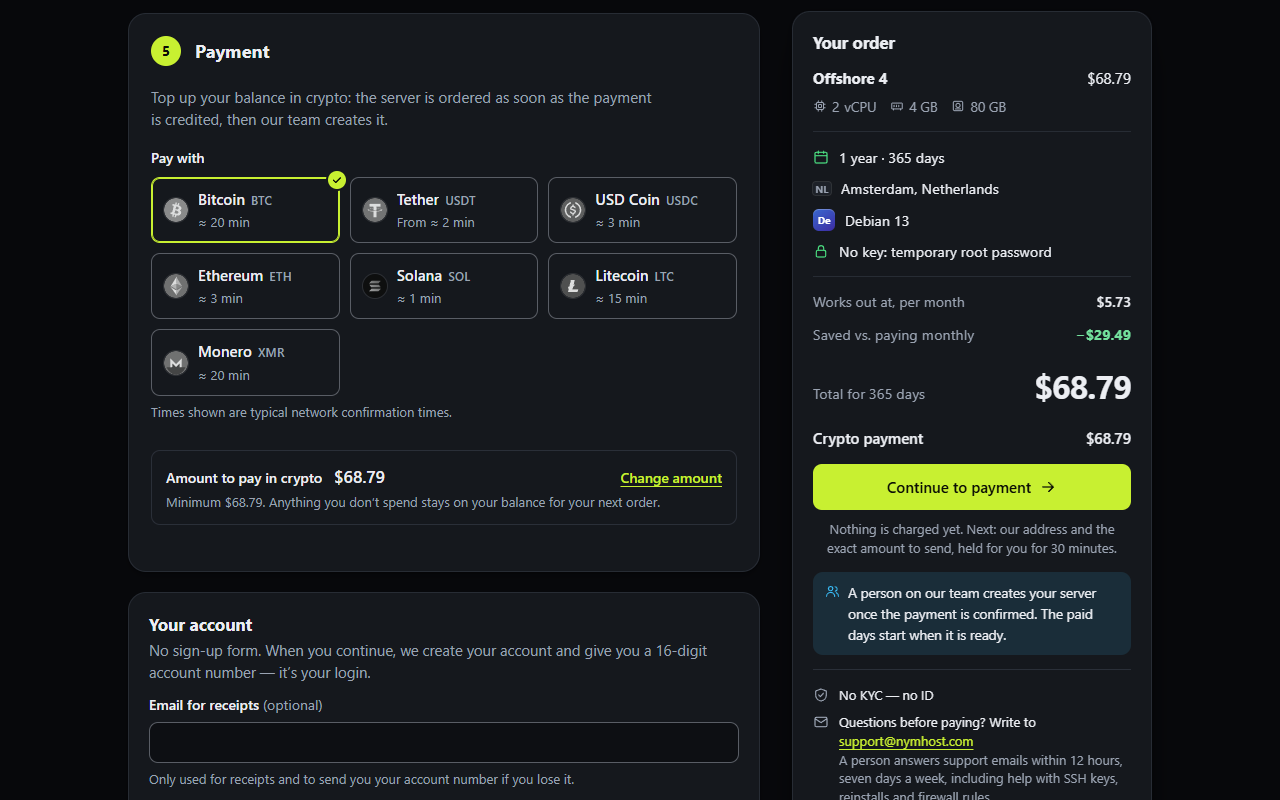
Bitcoin comes first in the checkout's list of coins. A Bitcoin VPS payment needs 2 confirmations at Nymhost, the second-lowest count of the seven coins, and the checkout shows about 20 minutes for them. You send BTC on the Bitcoin network to the address shown, in the exact amount. A Bitcoin payment sits on a public blockchain (see the explorer section below), and the sending address is checked against public sanctions lists of blockchain addresses; a payment from a listed address is not credited. If you want the lowest-trace route, use Monero.
USDT is pegged to the dollar, so the checkout amount does not move before you send. Nymhost takes it on Tron (TRC-20: 20 confirmations, about 2 minutes) and Ethereum (ERC-20: 12 confirmations, about 3 minutes); the address and the amount must match the network you pick. Fees, mistakes to avoid and the route from an exchange are in the guide to buy a VPS with USDT.
USDC is accepted on the Ethereum network only, with 12 confirmations. Ethereum (ETH) also needs 12 confirmations, and the checkout shows about 3 minutes for both. Both pay the usual Ethereum network fee.
Whatever coin you pay with, the part of a top-up added only to reach the $25 minimum can be refunded on request within 30 days of payment, in USDT or USDC, as long as it is unspent. Read when a refund applies before you rely on it.
A payment in Solana needs 1 confirmation, the lowest count of the seven coins, and the checkout shows about 1 minute. Send SOL on the Solana network to the address shown. As with Bitcoin, the transfer is public.
If you want to buy a VPS with Litecoin, the checkout asks for 6 confirmations on the Litecoin network and shows about 15 minutes for them. Send LTC to the address shown and check that the whole amount arrives.
Monero is the one coin on the list that hides the sender and the amount from a block explorer. It needs 10 confirmations, and the checkout shows about 20 minutes. How that works and what Nymhost still knows are on the Monero VPS page; running a Monero node of your own is covered on the blockchain node VPS page.
Send the exact amount shown, on the network you chose. Before you confirm in your wallet, check three things against the checkout: the coin, the network and the amount, after any exchange withdrawal fee.
If you made a mistake, write to [email protected] with the transaction ID. A transfer on the wrong chain is often impossible to reverse, so recovery cannot be promised. Nobody from the support team will ever ask for your account number, your root password or your private SSH key: the transaction ID is enough to find the payment.
A block explorer is a public website that lists every transaction on a chain. On Bitcoin, USDT, USDC, Ethereum, Solana and Litecoin, a payment is a public record. Whoever has the transaction ID, or Nymhost's receiving address, can look it up there. Nymhost keeps the amount, coin, network, transaction ID and date of each top-up, linked to your account number, plus the details of each VPS, and keeps no connection logs. The checkout does not ask for a name or an ID, but the chain itself is not private.
If the coins came from an exchange where you gave your ID, the exchange's records connect you to that withdrawal. And Nymhost checks the sending address against public sanctions lists on every coin except Monero.
A block explorer shows neither the sender nor the amount of a Monero payment. That is a property of the Monero protocol: according to the project's own pages, RingCT hides the amounts, origins and destinations of transactions. Billing still links your account number to your payments, the IP addresses of your VPS and the transaction ID of each payment, and your server's traffic still crosses the data-center network.
Every coin buys the same KVM VPS paid in crypto:
What it does not buy: Windows, hourly billing, backups, or DDoS protection beyond the data-center network's default filtering. Paid in crypto, it can also run crypto software: a Bitcoin or Monero node or a trading bot that never sleeps. For other jobs, the personal VPS guide gives the plan each one needs.
Prices below are for the plans you can pay for with any of the coins above. Pay for 3, 6 or 12 months to save 10%, 20% or 30%. Offshore 1 costs $3.09 for a month; the cheapest Global plan, Global 2, costs $3.19. The legal side of each city is on the offshore VPS hosting page.
Amsterdam · Reykjavik · Zurich · Bucharest
$3.09/ month
3 mo $8.346 mo $14.8312 mo $25.95
$4.89/ month
3 mo $13.206 mo $23.4712 mo $41.07
$8.19/ month
3 mo $22.116 mo $39.3112 mo $68.79
$13.49/ month
3 mo $36.426 mo $64.7512 mo $113.31
$20.49/ month
3 mo $55.326 mo $98.3512 mo $172.11
New York · Dallas · Los Angeles · London · Amsterdam · Frankfurt
$3.19/ month
3 mo $8.616 mo $15.3112 mo $26.79
$6.39/ month
3 mo $17.256 mo $30.6712 mo $53.67
$9.59/ month
3 mo $25.896 mo $46.0312 mo $80.55
$19.19/ month
3 mo $51.816 mo $92.1112 mo $161.19
$29.39/ month
3 mo $79.356 mo $141.0712 mo $246.87
Prices in US dollars, checked on 18 November 2026. Paid from a crypto balance (minimum top-up $25); 3, 6 and 12 months save 10, 20 and 30%. Every plan: KVM, root over SSH, 1 dedicated IPv4 + /64 IPv6, shared 1 Gbit/s port.
Yes. Your login is a 16-digit account number, and an email is optional. It only serves to recover a lost number. Without an email, a lost account number cannot be recovered, so store it carefully.
A top-up must be at least $25, whichever coin you use. The smallest plan costs $3.09 a month, and what you do not spend stays on your balance, which never expires.
No. Nymhost has no hourly billing: you rent for 1, 3, 6 or 12 months, paid ahead from your balance, so a monthly crypto payment is the shortest option. That is a drawback if you need a server for a few hours: compare hourly hosts such as BitLaunch.
No. Nymhost takes crypto only: Bitcoin, USDT on Tron or Ethereum, USDC, Ethereum, Solana, Litecoin and Monero, with a $25 minimum per top-up. There is no card, no PayPal and no bank transfer, so no payment processor holds your card details.
Partly. If a VPS cannot be set up, or does not run and support cannot fix it, the days it did not run go back to your balance, which never expires. Top-ups are not paid out unless the law requires it; the part added only to reach the $25 minimum comes back on request within 30 days, in USDT or USDC, if unspent. See the refund policy.
First the payment needs its confirmations (see the coins table: from about 1 minute on Solana to about 20 on Bitcoin or Monero). Then a person builds the VPS: usually within minutes, never more than 1 hour after the confirmation.
People and companies in Cuba, Iran, North Korea, Syria, Russia, Belarus, China, Yemen or Western Sahara, or in the occupied regions of Ukraine, and anyone under 18. On every coin except Monero, the sending address is looked up on public sanctions lists, and a payment from a listed address is not credited.
Choose a plan, top up at least $25 in your coin of choice, and log in within the hour. No sign-up form, no ID.