Offshore 1
$3.09/ month
3 mo $8.346 mo $14.8312 mo $25.95
- 1 vCPU
- 1 GB RAM
- 20 GB NVMe
- 2 TB traffic
Guide · Tor relay operators
Every Nymhost VPS may run a Tor exit relay, a middle relay or a bridge, and crypto is the only way to pay for one, Monero included. Here is which relay to run, which city and plan to pick, and a minimal setup with a reduced exit policy, the exit notice page and IPv6, from the Tor Project's own documentation.
Exits on Nymhost, in brief
Yes, you can run a Tor exit node on a Nymhost VPS: exit relays, middle relays and bridges are allowed on every plan. For an exit, pick an offshore city (Reykjavik, Zurich or Bucharest add the most diversity to the Tor network) and at least Offshore 2 (2 GB RAM, 4 TB of outgoing traffic a month, $4.89), since the Tor Project recommends 1.5 GB of RAM per exit. Install tor from the Tor Project repository, set ExitRelay 1, ReducedExitPolicy 1 and a ContactInfo, serve the exit notice on port 80, and cap the month's traffic with AccountingMax.
Many VPS providers do not allow exits, the Tor Project notes. On Nymhost the Tor-friendly rule covers exits too: exit relays, middle relays and bridges are allowed on every VPS, in writing, in the acceptable use policy. Three points frame it:
The account is an anonymous VPS paid in crypto with no ID, but a relay is public by design: its IP address, nickname and ContactInfo are published in the Tor directory, bridges excepted.
| Question for the host | Nymhost |
|---|---|
| Are exit relays allowed? | Yes, on every VPS |
| Dedicated IP address? | Yes: one IPv4 and a routed IPv6 /64 per VPS |
| Custom reverse DNS (PTR)? | Not a published feature: email support with the IP and the name |
| Custom WHOIS? | Not covered by the published policies: ask support before you order |
| Monthly traffic? | 2 to 20 TB outgoing; going over never triggers an automatic charge |
| Complaints about Tor users' traffic? | Copyright notices, DMCA included, are read by a person and forwarded to you; a notice alone does not suspend the VPS. Nymhost acts on a valid court order or a legally binding request. No separate procedure is published for other complaints: ask support before you order if you need one in writing |
The Tor Project's page on relay types ranks the three by exposure. A middle relay (a guard once it is stable and fast) passes encrypted traffic between relays and usually draws no complaints. A bridge is left out of the public directory to help people in countries that block Tor; it is low risk and needs little bandwidth. An exit relay opens the connection to the destination, so websites see its address: exits carry the most legal exposure, complaints reach you through the host, and the Tor Project says never to run one from home.
New to relays? Run a middle relay for a few weeks first; turning it into an exit later is one torrc line plus the notice page.
| Relay type | In the public directory | Complaints | Bandwidth | RAM |
|---|---|---|---|---|
| Bridge | No | Unlikely | 1 Mbit/s or more each way | No figure given |
| Middle or guard relay | Yes | Usually none | 10 Mbit/s minimum, 16 recommended, each way | 512 MB below 40 Mbit/s, 1 GB above |
| Exit relay | Yes | Yes, through your host | No separate minimum; a fast exit (100 Mbit/s+) handles about 100,000 connections | 1.5 GB per tor instance |
The same pages recommend more than 2 TB of traffic a month and a CPU with AES-NI: grep -m1 -wo aes /proc/cpuinfo prints aes if yours has it.
Two things decide it: the law the data center works under, and how many exits already run in that country. On law, pick an offshore city rather than New York, Dallas or Los Angeles, for the reason given above. On the network, the Tor Project asks operators to spread relays across countries and to avoid places where many already run. Its Onionoo service shows where today's exits are, with each country's share of exit probability: the chance that a Tor client picks an exit there. For Reykjavik's law and pings, see the Iceland VPS page.
| Country (Nymhost city) | Running exits | Share of exit probability | Nymhost range |
|---|---|---|---|
| Netherlands (Amsterdam) | 615 | 28.1% | Offshore and Global |
| Germany (Frankfurt) | 373 | 24.4% | Global |
| United States (New York, Dallas, Los Angeles) | 1,040 | 15.7% | Global |
| Romania (Bucharest) | 58 | 1.5% | Offshore |
| Switzerland (Zurich) | 26 | 1.1% | Offshore |
| Iceland (Reykjavik) | 20 | 0.4% | Offshore |
| United Kingdom (London) | 13 | 0.4% | Global |
2,818 exits were running in all. Iceland, Switzerland and Romania together held 3.0% of exit probability, the Netherlands alone 28.1%. An exit in Amsterdam still helps: the Tor Project says one relay on a crowded network beats none. The figures move every hour; check Relay Search before you order. How the four offshore countries differ in law is covered in offshore VPS: four countries, four laws.
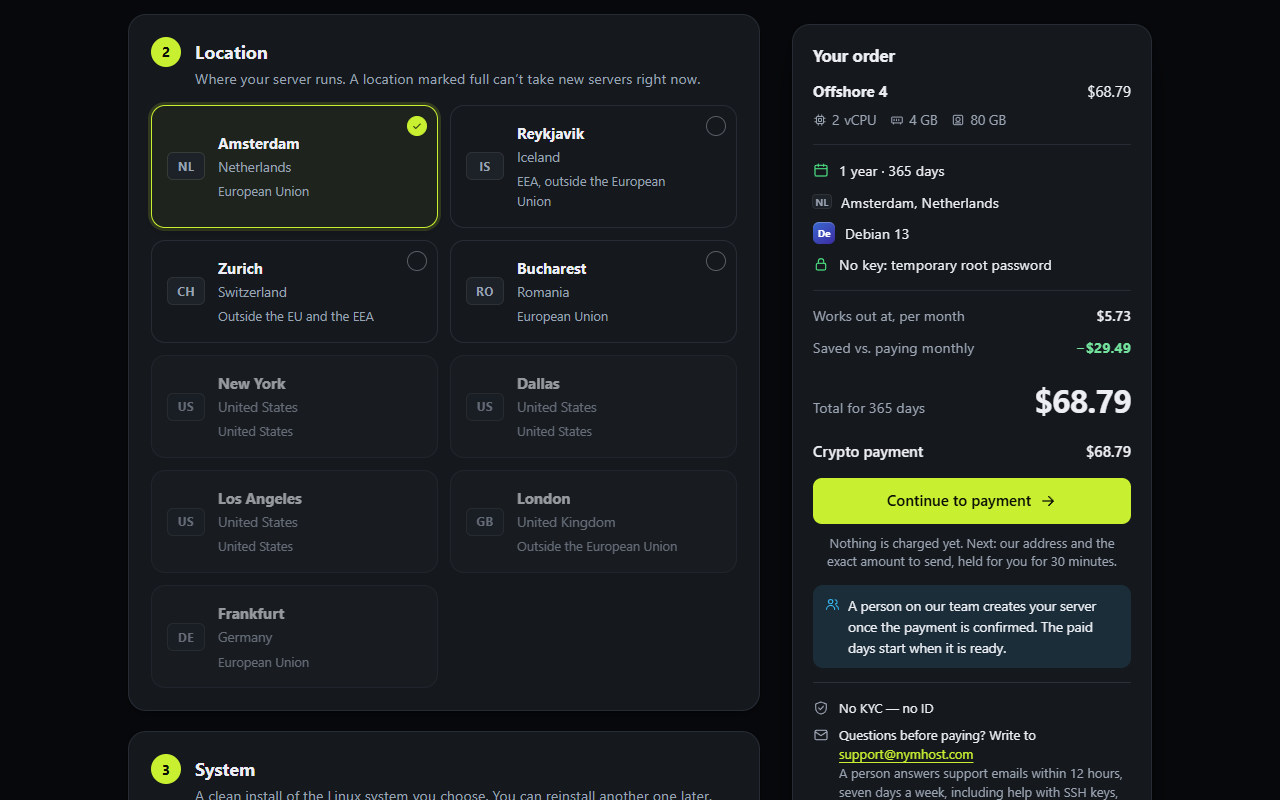
A relay sends out about as much as it receives: the Tor Project's minimum is 100 GB outbound plus the same inbound a month. Nymhost quotas count outgoing data, 2 to 20 TB a month, on a 1 Gbit/s port shared by the VPS on the same host. On a VPS for a Tor relay, the quota, not the CPU, sets your average speed.
| Plan (1 month) | RAM | Outgoing traffic | Average over 30 days | Fits | AccountingMax |
|---|---|---|---|---|---|
| Offshore 1 ($3.09) | 1 GB | 2 TB | 6.2 Mbit/s | Bridge; middle relay that sleeps part of the month | 1700 GBytes |
| Offshore 2 ($4.89) | 2 GB | 4 TB | 12.3 Mbit/s | Middle relay; smallest exit | 3400 GBytes |
| Offshore 4 ($8.19) | 4 GB | 8 TB | 24.7 Mbit/s | Middle relay above 16 Mbit/s; exit | 6800 GBytes |
| Offshore 8 ($13.49) | 8 GB | 12 TB | 37.0 Mbit/s | Exit | 10200 GBytes |
| Offshore 16 ($20.49) | 16 GB | 20 TB | 61.7 Mbit/s | Busiest exit | 17000 GBytes |
A fast exit at 100 Mbit/s for a whole month would need about 32 TB of outgoing traffic, more than any plan includes.
The steps follow the Tor Project's relay and exit guides and the tor manual of Debian 13 (tor 0.4.9); on Debian 12 write bookworm as the suite. On Ubuntu, systemd-resolved manages /etc/resolv.conf and the Tor Project warns that step 2 needs more work there. Run every command as root.
Install tor from the Tor Project's repository, with the keyring package that keeps the signing key current.
An exit resolves names for its users. The Tor Project asks for a local caching resolver with no forwarders, not Google, Cloudflare, Quad9 or OpenDNS.
Nickname, ContactInfo, ExitRelay 1, ReducedExitPolicy 1, the notice on port 80 and the traffic cap.
Copy the template shipped with tor and replace its FIXME markers.
Email support with your IP address and a name such as tor-exit.example.org on a domain you own.
Open ports 443 and 80, restart tor@default and wait for the reachability line.
apt update && apt install -y apt-transport-https gnupg wget
cat > /etc/apt/sources.list.d/tor.sources <<'EOF'
Types: deb deb-src
URIs: https://deb.torproject.org/torproject.org/
Suites: trixie
Components: main
Signed-By: /usr/share/keyrings/deb.torproject.org-keyring.gpg
EOF
wget -qO- https://deb.torproject.org/torproject.org/A3C4F0F979CAA22CDBA8F512EE8CBC9E886DDD89.asc | gpg --dearmor | tee /usr/share/keyrings/deb.torproject.org-keyring.gpg >/dev/null
apt update && apt install -y tor deb.torproject.org-keyringapt install -y unbound
cp /etc/resolv.conf /etc/resolv.conf.backup
echo nameserver 127.0.0.1 > /etc/resolv.conf
# stops other tools from rewriting it; undo with chattr -i
chattr +i /etc/resolv.conf
systemctl enable --now unboundReplace /etc/tor/torrc with these lines, here for Offshore 2; take your plan's AccountingMax from the table above. The nickname is 1 to 19 letters and digits, and SocksPort 0 keeps tor from acting as a client. IPv6Exit stays commented out until the IPv6 test below passes. If your Nymhost traffic count does not restart on the 1st, ask support which day it does and use that day (1 to 28) in AccountingStart.
Nickname    nymexit1
ContactInfo [email protected]
ORPort      443
ExitRelay   1
ReducedExitPolicy 1
# IPv6Exit 1
SocksPort   0
DirPort     80
DirPortFrontPage /etc/tor/tor-exit-notice.html
AccountingStart month 1 00:00
AccountingRule out
AccountingMax 3400 GBytesThe exit policy decides which destination ports your exit forwards. The Tor Project's exit guide calls it one of the most important settings: fewer ports mean less abuse mail but a less useful exit, and 80 and 443 must be open. It advises new operators to start reduced.
ReducedExitPolicy 1 is a built-in tor option. The manual lists its 73 accepted entries: web (80, 443, 8080, 8443), DNS (53), SSH (22), mail retrieval and submission (110, 143, 465, 587, 993 to 995), chat, version control and a few wallets. Everything else is rejected, including port 25 and the BitTorrent range 6881 to 6999. The Tor blog's exit tips report that a reduced policy stopped the BitTorrent copyright complaints its author received. ExitPolicyRejectPrivate, on by default, blocks private networks and the relay's own addresses.
Anyone who looks up your exit's address should find a page saying it is a Tor exit before they write a complaint; the template's own notes say such a page cuts complaints. Debian's tor package installs it as /usr/share/doc/tor/tor-exit-notice.html. Copy it and edit the FIXME lines: FIXME_DNS_NAME, FIXME_YOUR_EMAIL_ADDRESS, and a US-only section the template tells non-US operators to remove.
With DirPort 80 and DirPortFrontPage, tor serves the page itself. Since tor 0.4.6 a relay no longer publishes its DirPort, but the manual says it still listens on it, so the notice keeps working.
cp /usr/share/doc/tor/tor-exit-notice.html /etc/tor/tor-exit-notice.html
# if the file is missing, the same template is in the tor source:
# wget -O /etc/tor/tor-exit-notice.html https://gitweb.torproject.org/tor.git/plain/contrib/operator-tools/tor-exit-notice.html
grep -n FIXME /etc/tor/tor-exit-notice.htmlRestart tor and read the journal. The Tor Project's post-install guide names the lines to wait for: the self-test saying your ORPort is reachable from the outside, then Publishing server descriptor. About three hours later the relay appears in Relay Search by nickname or IP address. Traffic comes slowly: the Tor blog's 2013 post on a new relay's lifecycle describes about three days before it is measured.
Nyx shows live relay data, vnstat counts the VPS's own traffic (the figure to compare with your quota), and Tor Weather can notify you of an outage. Keep graphs and any MetricsPort private: the Tor Project warns that public monitoring data can help deanonymize users. When a complaint names your address, ExoneraTor shows anyone whether an IP address was a Tor relay on a given date.
# only if you run ufw:
ufw allow 443/tcp
ufw allow 80/tcp

systemctl restart tor@default
journalctl -e -u tor@defaultEvery Nymhost VPS has a routed IPv6 /64. The Tor Project encourages IPv6, above all on exits and guards, though tor still needs IPv4. Since tor 0.4.5 an ORPort line without an address listens on both and finds the IPv6 address by itself. Test first: the post-install guide warns that a relay with broken IPv6 stays unused even when IPv4 works. Its test below prints OK. when five directory authorities answer.
Once it passes, uncomment IPv6Exit 1. On 18 November 2026, 2,462 of the 2,818 running exits also accepted IPv6 exit traffic (Onionoo). Add an explicit IPv6 ORPort, in square brackets, only for an address you know works: if its reachability check fails, the relay stops publishing its descriptor.
ip -6 addr | grep global | sed 's/inet6//;s#/.*##'
ping6 -c2 2a02:16a8:662:2203::1 && ping6 -c2 2620:13:4000:6000::1000:118 && ping6 -c2 2001:67c:289c::9 && ping6 -c2 2001:678:558:1000::244 && ping6 -c2 2001:638:a000:4140::ffff:189 && echo OK.

# in /etc/tor/torrc, once the test prints OK.:
IPv6Exit 1
# optional, with your own address:
# ORPort [2001:db8::10]:443A Tor bridge VPS is the low-risk choice: bridges stay out of the public directory, need about 1 Mbit/s and rarely draw complaints. Offshore 1 ($3.09) or Global 2 ($3.19) is enough, so a bridge can run in any of the nine cities. The Tor Project's Debian guide uses obfs4, packaged as obfs4proxy in Debian 12 and 13. Use two different ports, both open, and avoid 9001, which censors scan; ports under 1024 need extra systemd changes. The scanner at bridges.torproject.org/scan/ checks that the obfs4 port is reachable.
apt install -y obfs4proxy

# /etc/tor/torrc
BridgeRelay 1
ORPort 8443
ServerTransportPlugin obfs4 exec /usr/bin/obfs4proxy
ServerTransportListenAddr obfs4 0.0.0.0:8444
ExtORPort auto
ContactInfo [email protected]
Nickname nymbridge1

systemctl restart tor.serviceA relay does not change what is forbidden on a VPS: no spam, no scanning or brute-forcing other people's systems, no attacks, no mining. Two habits help:
Outbound port 25 is open on every Nymhost VPS, but tor's default and reduced exit policies both reject it, so Tor users cannot send mail straight through your exit.
A relay publishes its IP address, nickname and ContactInfo, so you may want at least the payment kept out of public view. Crypto is the only way to pay Nymhost, and with Monero a block explorer shows neither the sender nor the amount; the top-up is credited after 10 confirmations, about 20 minutes on the checkout. Billing still links your account number to the VPS, its IP addresses and the transaction ID, so Monero hides the payment, not the relay. A top-up starts at $25, enough for 5 months of an Offshore 2 exit at the 1-month price, and the balance never expires; paying for a relay VPS in Monero explains the steps.
Offshore plans run in Reykjavik, Zurich, Bucharest and Amsterdam; Offshore 2 is the smallest with the memory for an exit. Rent for 3, 6 or 12 months to save 10, 20 or 30%. The pricing page also lists the Global plans, for middle relays and bridges in the US, London and Frankfurt.
Amsterdam · Reykjavik · Zurich · Bucharest
$3.09/ month
3 mo $8.346 mo $14.8312 mo $25.95
$4.89/ month
3 mo $13.206 mo $23.4712 mo $41.07
$8.19/ month
3 mo $22.116 mo $39.3112 mo $68.79
$13.49/ month
3 mo $36.426 mo $64.7512 mo $113.31
$20.49/ month
3 mo $55.326 mo $98.3512 mo $172.11
Prices in US dollars, checked on 18 November 2026. Paid from a crypto balance (minimum top-up $25); 3, 6 and 12 months save 10, 20 and 30%. Every plan: KVM, root over SSH, 1 dedicated IPv4 + /64 IPv6, shared 1 Gbit/s port.
On many hosts, no: the Tor Project notes that many VPS providers forbid exits. On Nymhost, yes: the acceptable use policy allows exit relays, middle relays and bridges on every VPS. For an exit, choose an offshore city and at least Offshore 2, with 2 GB of RAM.
More than any other relay, according to the Tor Project: websites see the exit's address, so complaints about Tor users' traffic reach its operator. Its exit guidelines ask you to know the liability rules in your country and the host's, citing section 512 of the US DMCA and Article 4 of EU Regulation 2022/2065. Nymhost LLC, a US company, can receive US legal process, hands over records only when the law requires it and keeps no connection or traffic logs. This is not legal advice.
As much as you allow. The Tor Project asks for at least 10 Mbit/s each way for a middle relay, 1 Mbit/s for a bridge, and recommends more than 2 TB a month. Nymhost plans include 2 to 20 TB of outgoing traffic, 6.2 to 61.7 Mbit/s on average over 30 days.
With AccountingMax set below the quota, tor hibernates first and wakes up in the next accounting period. Without it, tor keeps relaying; on Nymhost, going over the quota never triggers an automatic charge. Keep about 9% of the quota for updates, SSH and DNS lookups.
Better not: the Tor Project's exit guide says not to mix your own traffic with the exit's. A middle relay or a bridge can share a VPS with your WireGuard tunnel; for an exit, run the VPN on a second VPS.
Yes. Bridges are not listed in the public Tor directory, need about 1 Mbit/s and rarely draw complaints, according to the Tor Project. Offshore 1, with 2 TB of outgoing traffic a month, is enough for an obfs4 bridge on a port other than 9001.